Understanding Security Features in Motorola Radios
The security features in Motorola radios help businesses protect important communications, manage radio devices and control access to their communication systems.
Two-way radios play an important role in security, healthcare, manufacturing, transportation, hospitality, education and other industries. Teams use them to share updates, coordinate daily tasks and respond to emergencies.
However, reliable communication is only part of the solution.
Businesses must also consider who can access their radio communications and what happens when a device is lost or stolen. Fortunately, modern Motorola MOTOTRBO™ radios offer several security features that can help organisations protect their communication systems.
Depending on the radio model, software, licence and system configuration, these features can include Enhanced Privacy, AES256 encryption, Radio Disable/Enable, Secure Processor and Digital Certificates.
In this guide, we explore the security features in Motorola radios, explain how they work and show businesses what to consider when choosing a secure two-way radio system.
What Are the Security Features in Motorola Radios?
Motorola MOTOTRBO radios offer different security capabilities depending on the model and system.
Common security features include:
- Basic Privacy
- Enhanced Privacy
- AES256 encryption on supported models
- Radio Disable/Enable
- Authentication
- Secure Processor
- Digital Certificates
- Radio management
- Controlled communication groups
For example, the MOTOTRBO R2 includes Enhanced Privacy and Radio Disable/Enable among its listed features.
The MOTOTRBO R7 offers a wider range of security capabilities, including Enhanced Privacy, AES256 encryption, Radio Disable/Enable, Secure Processor and Digital Certificates on supported configurations.
Therefore, businesses should always check the specifications of the exact radio model before making a purchase.
Looking for the right Motorola radio for your business? Explore our Motorola two-way radios to compare solutions for different industries and working environments.
1. Motorola Radio Privacy: Protecting Your Conversations
One of the most common security features in Motorola radios is privacy.
Motorola’s R2 user guide explains that its privacy feature uses software-based scrambling to make communications harder for unauthorised users to understand. The R2 supports Basic Privacy and Enhanced Privacy, depending on the radio configuration. (Motorola Solutions)
When privacy is enabled, compatible receiving radios need the correct privacy key information to unscramble the communication.
Why Does Radio Privacy Matter?
Consider a security team working at a busy stadium.
A security officer might say:
“Security team, please proceed to Gate 3.”
Another message could be:
“Unauthorised access detected at the loading bay.”
These messages may sound simple. However, they can reveal information about a site’s security operations.
Privacy features can therefore help reduce the risk of unauthorised listeners understanding protected radio conversations.
Privacy vs Encryption: What Is the Difference?
People often use the words privacy and encryption in the same way. However, they can refer to different levels of communication protection.
Motorola offers different protection options across its MOTOTRBO portfolio. Supported models can include Enhanced Privacy and AES256 encryption.
The right option depends on the type of information your team handles and the security needs of your organization.
2. AES256 Encryption for Higher-Level Communication Security
Businesses with higher security requirements may want to consider AES256 encryption.
AES stands for Advanced Encryption Standard. It is a recognised encryption standard that uses a 256-bit key in AES256.
Motorola lists AES256 encryption as an available capability on supported MOTOTRBO R7 configurations.
Where Can AES256 Encryption Help?
Businesses that handle sensitive communications may consider stronger encryption for:
- Security operations
- Government facilities
- Critical infrastructure
- Healthcare
- Transportation
- Industrial sites
- Large event venues
- High-security commercial facilities
For example, a stadium security team may need to discuss restricted areas, security incidents or emergency response plans.
In these situations, encryption can provide an additional layer of protection for radio communications.
Guide: Do You Need AES256 Encryption?
Before choosing a radio, ask these questions.
Does your team communicate sensitive information?
If employees regularly discuss security incidents, confidential operations or sensitive information, stronger communication protection may be appropriate.
Do several departments share the same radio system?
If so, communication groups and access controls should form part of your system design.
Does your organization operate in a high-security environment?
If yes, include radio security when planning your communication system.
Does your organization have security or compliance requirements?
If so, compare those requirements with the security features available on the radio models you are considering.
Related guide: Learn more about how to choose the right two-way radio for your business.
3. Radio Disable/Enable: What Happens If a Radio Is Lost?
A lost radio can create more than a replacement cost.
The device may still contain programmed channels and could remain connected to the organisation’s communication system.
So, what can you do when a radio goes missing?
Selected Motorola MOTOTRBO radios support Radio Disable/Enable. This feature allows an authorised user or system to disable and later re-enable a radio, depending on the system configuration. Motorola lists this capability for both the R2 and R7.
Motorola also provides official guidance on configuring Radio Disable and Enable through Customer Programming Software (CPS).
Why Is Radio Disable Useful?
For a small business, losing one radio may be inconvenient.
For a company managing 100 or 500 devices, however, a missing radio can create a larger security concern.
Remote radio disable gives administrators another way to manage lost, stolen or compromised devices.
Guide: What Should You Do When a Radio Goes Missing?
Businesses should create a clear process:
- Report the missing radio immediately.
- Confirm the radio ID or device details.
- Notify the authorised radio administrator.
- Disable the radio if the system supports the feature.
- Record the incident for internal tracking.
- Re-enable the radio if it is recovered and cleared for use.
The exact process depends on your radio system and internal security policy.
4. Authentication: Making Sure Devices Are Trusted
Radio security does not stop with the conversation itself.
Businesses should also consider who and what can access the communication system.
Motorola supports authentication and security features within selected MOTOTRBO systems and devices. These features can help organizations control access and protect system configuration.
This becomes even more important as a radio fleet grows.
Imagine a business with:
- 150 radios
- Several departments
- Multiple operating locations
- Different access levels
- More than one radio administrator
Managing every device manually can become difficult.
A properly designed MOTOTRBO system can give administrators greater control over radio access, configuration and communication groups.
5. Secure Processor and Digital Certificates
Radio security can also extend into the device itself.
Motorola’s R7 documentation lists Secure Processor and Digital Certificates among its security capabilities. Availability depends on the specific model and configuration.
This reflects an important change in professional radio technology.
Modern business radios do much more than transmit voice.
They can connect with:
- Voice systems
- Data networks
- Wi-Fi
- Software applications
- Sensors
- Security systems
- Other connected devices
For example, Motorola highlights the R7’s ability to work with connected technologies such as video security systems and gas sensors. (Motorola Solutions)
As radios become more connected, businesses need to consider device security alongside voice communication security.
6. Secure Wi-Fi Connectivity on Advanced MOTOTRBO Radios
Some advanced MOTOTRBO radios also connect to Wi-Fi networks.
The R7 user guide documents support for WPA/WPA2/WPA3-Enterprise Wi-Fi. It also describes certificate-based authentication for enterprise Wi-Fi when the network uses client certificate verification. (Motorola Solutions)
Why does this matter?
A connected radio can communicate with more than another radio. It can also interact with a wider digital communication system.
A simple radio setup might look like:
Radio → Radio
A more advanced environment can look like:
Radio → Radio System → Network → Applications → Security Systems
As a result, businesses need to consider the security of the wider system, not just the handheld radio.
7. Security Is More Than Encryption
One of the biggest misconceptions about radio security is that encryption alone makes a communication system secure.
It doesn’t.
A strong communication strategy should consider multiple layers.
Layer 1: The Device
- Who has the radio?
- Is it properly configured?
- What happens if it is lost?
Layer 2: The User
- Who is authorized to use it?
- What information can they access?
Layer 3: The Communication System
- Which talk groups and channels can users access?
Layer 4: The Network
- How are connected systems and data protected?
Layer 5: Administration
- Who can change configurations?
- Who can enable or disable radios?
Layer 6: Operational Procedures
- What should employees do if a radio is lost?
- What information should or should not be transmitted?
Real communication security comes from combining technology with good operational practices.
Guide: How to Choose a Secure Motorola Two-Way Radio
Choosing a radio based only on price or range can lead to the wrong solution.
Instead, start with your actual business needs.
Step 1: Identify the Information Your Team Shares
First, consider what employees discuss over the radio.
Routine operational messages may require a different security approach from sensitive security or emergency communications.
For example, a hotel housekeeping team may mainly discuss room status. A security team, meanwhile, may communicate about incidents, restricted areas and emergency response.
Therefore, the type of information should influence your security requirements.
Step 2: Decide What Level of Security You Need
Next, consider which features may be relevant:
- Basic Privacy
- Enhanced Privacy
- AES256 encryption
- Authentication
- Radio Disable/Enable
- Secure device management
- Digital certificates
Remember that feature availability differs between MOTOTRBO models.
Step 3: Consider Your Number of Users
A small team may only need a simple communication setup.
Larger organizations, however, may need:
- Multiple talkgroups
- Different access levels
- Centralised configuration
- Fleet management
- Remote programming
- Device control
Therefore, fleet size should form part of your radio system planning.
Step 4: Consider the Working Environment
Security is important. However, it is not the only factor.
You should also consider:
- Coverage
- Range
- Audio quality
- Battery life
- Durability
- Water and dust protection
- Emergency features
- Connectivity
- Integration with other systems
For example, Motorola designed the R7 for demanding environments and gives it advanced audio, rugged construction and connectivity features. (Motorola Solutions)
The R2, meanwhile, focuses on simple and reliable professional communication. It includes Enhanced Privacy, Radio Disable/Enable, IP55 protection and a rugged design.
Motorola R2 vs R7: Which Is Better for Security?
The answer depends on your requirements.
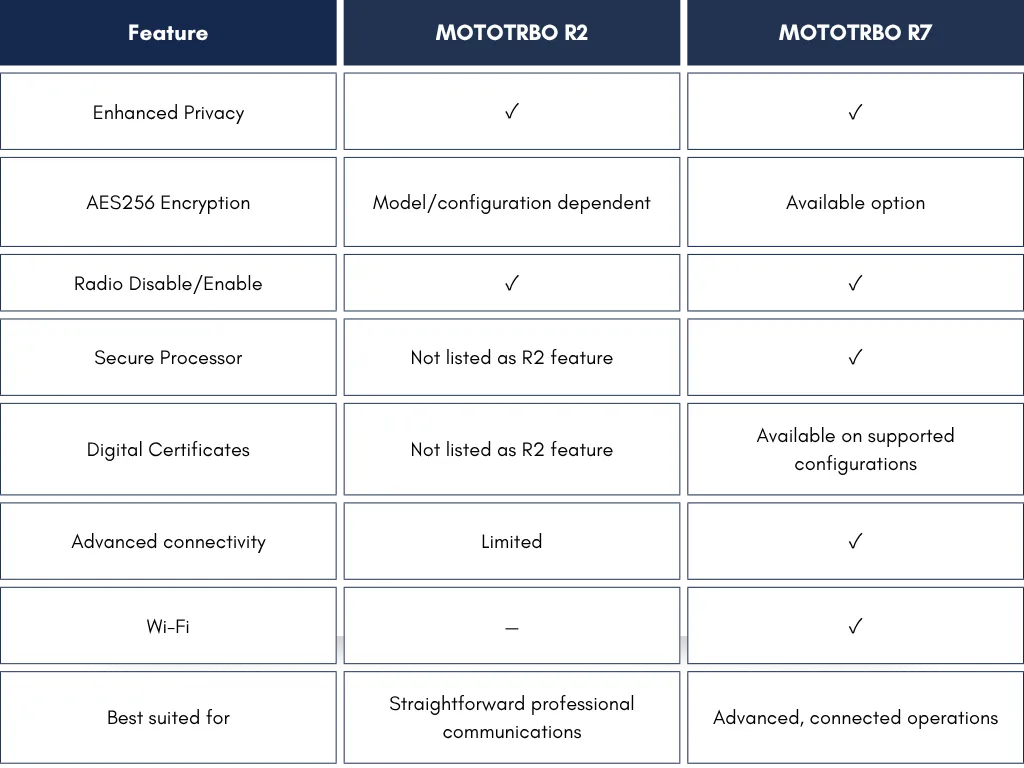
Motorola’s published specifications should always be checked for the exact model and configuration being considered.
In simple terms:
Choose R2 when:
You need a reliable, straightforward professional radio with essential security and communication capabilities.
Consider R7 when:
You need a more advanced platform with enhanced security options, connectivity, device capabilities and integration potential.
Explore more Motorola solutions: Visit our Motorola MOTOTRBO radio range to find radios for different business environments.
Build a More Secure Communication System With Triple Access
For security teams, facility managers, event organisers and businesses across Malaysia, choosing the right two-way radio is only the beginning.
The real challenge is designing a communication system that works for your people, environment and security requirements.
At Triple Access Sdn Bhd, we provide Motorola communication solutions designed around real operational requirements.
From selecting the appropriate MOTOTRBO radio to planning coverage and configuring communication systems, our team can help organisations understand which features are relevant to their operations.
Whether you are managing a stadium, hospital, university, manufacturing facility, security operation, logistics site or commercial building, we can help you evaluate the right communication solution.
Need secure and reliable two-way radio communication?
Talk to Triple Access today to explore Motorola MOTOTRBO radios and find a solution suited to your organisation.